Configration
Enable UAE E-Invoicing
Navigate to:
Company → UAE E-Invoicing Section
Enable the option:
☑ UAE E-Invoice Enabled
⚠️ Note: Invoices will be submitted to FTA only when this option is enabled.
Configure API Credentials
Enter the required details:
- Base URL
Example: https://sb-ae-api.flick.network - Participant ID
Unique identifier assigned to your business - X-Flick-Auth-Key
Secret key used for API authentication
Verify Token
Click: Verify Token
If successful, you will receive a response like:
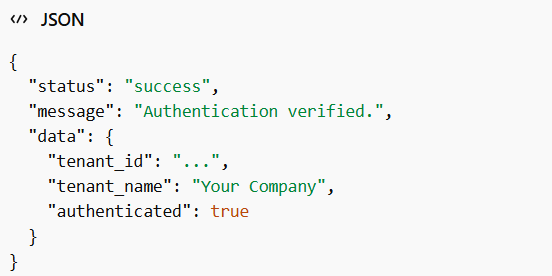
This confirms:
- Credentials are valid
- System is successfully connected to Flick
Generate OAuth2 Access Token
Using:
- Client ID
- Client Secret
The system generates an Access Token, which is required for:
- Invoice submission
- API communication
The token is automatically stored and reused until it expires.
Fetch Participant Details
Click: Get Participant Details
This retrieves:
- Business identifiers (e.g., VAT/TRN)
- Contact details
- Registration information
Invoice Submission Flow
Once the setup is complete, the process becomes fully automated:
- User creates a Sales Invoice in ERPNext
- System checks if:
UAE E-Invoice Enabled = ON - System automatically:
- Generates invoice payload (structured format)
- Determines authentication method:
- Uses X-Flick-Auth-Key for direct authentication
- Otherwise → OAuth2 is configured → Authenticates using Access Token
- Submits invoice to Flick API using the selected authentication methodFlick forwards the invoice to FTA
- Response is received and stored in ERPNext
Generate Invoice PDF
Generates a human-readable PDF version of the invoice. This PDF is automatically created and attached during invoice transmission, ensuring easy viewing and sharing of the invoice.
Generate UBL XML
Generates the UBL 2.1 XML representation of the invoice. This XML is structured as per e-invoicing standards and is automatically attached along with the invoice for compliance and system integration.
UAE Integration Fields
- Invoice out of scope of tax
→ Marks the invoice as not subject to VAT under UAE regulations. - Credit note related to goods or services (out of scope)
→ Indicates a credit note for transactions that are not subject to VAT. - VAT Category
→ Defines the VAT classification applied to the invoice (e.g., standard, zero-rated, exempt). - Frequency Billing Code List
→ Specifies the billing frequency type (e.g., daily, weekly). - Invoice Note → Provides additional information or description related to the invoice.
- Payment Means Codes
→ Indicates the method of payment used (e.g., cash, bank transfer, etc.). - Is Return (Credit Note)
→ Enable this before submitting the invoice to process it as a credit note for a return or adjustment against a previous invoice. - UAE E-Invoice Status
→ Shows the submission status of the invoice in the UAE e-invoicing system. - Reporting Status
→ Indicates whether the invoice has been successfully reported to the authority.